Trellix Application Control (formerly known as Solidcore) is a powerful allowlisting solution designed to protect servers and endpoints from unauthorized changes. By enforcing a strict “deny by default” model, it ensures that only trusted applications and processes can execute.
However, this same strength can sometimes create operational challenges—especially when Local Access is locked down. Administrators may suddenly find themselves unable to run commands locally, even for legitimate troubleshooting or recovery tasks.
What Is Trellix Application Control?
Trellix Application Control is an endpoint security solution that prevents unauthorized code execution by enforcing allowlisting (also referred to as whitelisting).
Key capabilities include:
- File and process allowlisting
- Protection against zero-day and fileless attacks
- Change control and audit logging
- Centralized management via ePO
- Strong lockdown and tamper protection mechanisms
Once a system is in Enabled or Locked mode, only approved changes are allowed—everything else is blocked.
Understanding “Local Access Has Been Locked Down”
When administrators attempt to run commands locally and receive the message:
Local Access has been locked down. This command is not allowed.
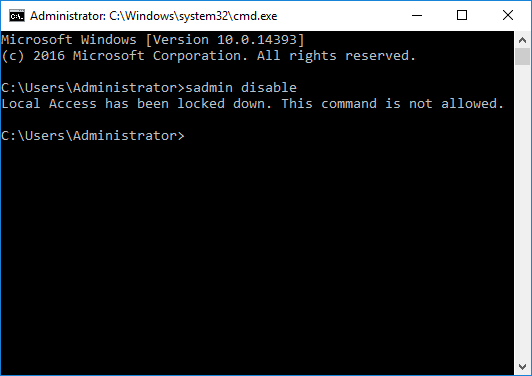
It means that Application Control is actively preventing local administrative actions.
This typically occurs when:
- Local CLI access is restricted by policy
- The system is in Lockdown mode
- Tamper protection is enabled
- Local recovery access is intentionally disabled
- A misconfigured policy prevents emergency access
From a security perspective, this is expected behavior. From an operations perspective, it can be alarming if you’re not prepared.
Supported Recovery Method: sadmin recover -f
When local access is locked down, Trellix provides a supported recovery command that allows administrators to regain control.
Recovery Command
sadmin recover -fDefault Recovery Password
solidcoreThis command forces the system into recovery mode, allowing you to regain administrative access and correct policy or configuration issues.
When the Default Password Does Not Work
In many enterprise environments, the default recovery password is changed via centralized policy.
If solidcore does not work, the password has likely been overridden in ePO.
Policy Catalog Path:
Policy Catalog → Solidcore 8.3.4 → Configuration (Client) → Applied Policy (Edit)
Within this policy, administrators can:
- Set or change the recovery password
- Control whether local recovery is permitted
- Enable or disable local CLI access
- Define lockdown and tamper protection behavior
Changes must be applied and enforced on the affected endpoint before they take effect.
FAQ
Is sadmin recover -f safe to use?
Yes—when used by authorized administrators for recovery purposes. It is an officially supported command.
Can attackers misuse this command?
Only if they already have administrative access and the recovery password. Strong password hygiene and access control mitigate this risk.
Does recovery disable Application Control permanently?
No. It allows recovery actions. Enforcement can and should be re-enabled afterward.